
How to Clean RC Car Electronics Safely and Effectively
Learn how to clean RC car electronics safely with step-by-step tips to protect your ESC, receiver, and connectors from damage.
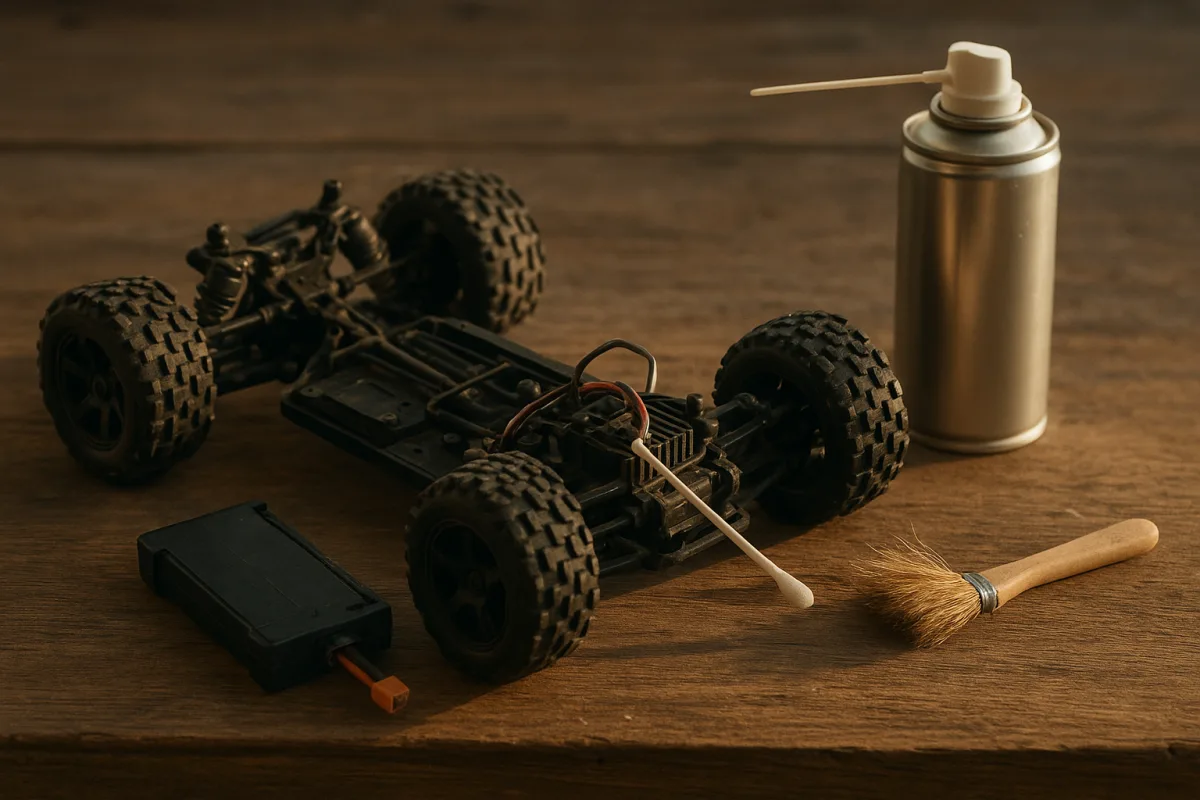
Start before the cleaning stand: make the car electrically safe
The first job is not grabbing a brush. Switch the car off, unplug the drive battery, and remove it from the chassis. RC Tech Tips specifically warns that cleaning with batteries installed can cause permanent damage. [10]
That applies whether you are cleaning a 1/10 touring car after a dusty club race or a 1/8 electric truggy after a muddy heat. A 4S truggy pack has more stored energy than a 2S buggy pack, but neither belongs in the car during cleaning.
Remove the body shell and inspect the battery tray, connector, and balance lead before doing anything wet. Dirt packed around an XT90, EC5, IC5, XT60, or bullet connector can hold moisture exactly where you do not want it.
If the battery itself is muddy, clean its exterior separately with a barely damp cloth, keeping fluid away from the connector and balance plug. The research brief does not support washing packs or giving them a fixed drying time, so keep that job conservative.
This is also the point to unplug a fan if it is buried in mud and easy to access. Do not start yanking sensor wires, receiver leads, or fan plugs just because the car is dirty. A broken signal wire creates more trouble than a dusty one.
Deal with loose dirt before adding any cleaner
A lot of racers reach for spray first, and that is backwards. Get the loose dirt off dry, so you are not turning dusty clay into abrasive paste around the ESC fan, servo output spline, receiver box seal, and connectors.
Use a soft brush around the chassis and electronics, then use compressed air to clear the corners. EuroRC and RC Tech Tips recommend controlled compressed air in the 100 to 120 PSI range. [7][10]
Do not assume more pressure is better. Above 150 PSI, the air stream can force debris into bearings or blow seals out of place, which is a poor trade when a few seconds with a soft brush would have done the job. [7][10]
For a 1/10 2WD buggy, concentrate on the rear gearbox area, motor wires, ESC fan, and receiver box lid. That layout collects dry track dust behind the battery and around the motor, where it can later migrate into plugs.
On a 1/8 buggy or truggy, work around the bigger fan openings, exposed receiver switch, servo horn, and brake-area grime if it is nitro. These vehicles throw more dirt at higher speed, but that does not make a high-pressure blast safe.
Hold the air nozzle back rather than putting it against the component. You are trying to lift dust out of cooling fins and wire loops, not pressure-wash the dirt deeper into the chassis.
When the dirt is stuck: clean the chassis without soaking electronics
Mud is where a quick post-run wipe turns into a bad decision. The safest route is to clean chassis plastics, suspension arms, and wheels while keeping the electronics section dry and protected.
Water is generally discouraged around RC electronics. EuroRC and Shock & Servo allow a low-pressure rinse only on a waterproof chassis, followed by immediate, thorough drying. [7][9]
That means no garden-hose blast, no pressure washer, and no sending a 1/10 crawler through the sink because the receiver box says waterproof. “Waterproof” does not mean every connector, switch, fan, or seal remains perfect after use and wear. [10]
If you must rinse mud from a chassis, shield the ESC, receiver box openings, motor, and exposed plugs with plastic wrap or use waterproof boxes. RC Tech Tips notes that water-resistant ESCs and receivers still require protection during wet cleaning. [10]
Keep the rinse low pressure and targeted at dirty plastics, not at the electronic bay. Then move straight back to dry brushing and controlled air. Leaving water trapped under an ESC tray or receiver-box lid is how a “waterproof” car becomes a corrosion project.
Harsh degreasers are not the answer to stubborn dirt. RC Tech Tips warns that harsh chemicals and frequent degreaser use can degrade plastics, so reserve any cleaning chemical for the specific dirty area rather than soaking the entire chassis. [10]
Clean the ESC without flooding the fan or heat sink
The ESC is usually the first electronic part to get packed with dust, especially in a 1/10 stadium truck or a 1/8 e-buggy running an exposed fan. Start with a soft brush and air, concentrating on the heat-sink fins and fan guard.
Do not spray cleaner directly into the ESC. ModelPress recommends applying cleaning agent to a lint-free swab or cloth instead of spraying electronics directly. [1]
For residue on the outer case, wires, or accessible plug housings, use 90% or higher isopropyl alcohol on that swab or cloth. Lower-concentration IPA carries more water, which can promote oxidation rather than prevent it. [1]
CRC QD Electronic Cleaner and DeoxIT D5 are also identified as electronics-safe, quick-evaporating contact cleaners. [2] They make sense for contaminated connectors and accessible electrical contacts, not as a reason to hose down the ESC.
Be especially careful around the cooling fan. A dirty fan can be brushed and blown clean, but the brief does not establish a detailed procedure for washing individual fan assemblies, so do not force solvent through the motor hub or ESC opening.
If an ESC is full of wet clay, remove the bulk mechanically first. A brush, cloth, and controlled air may take longer than a direct spray, but the expensive speed control is not where I would gamble on shortcuts.
Protect the receiver and its connections
The receiver is not a place for aggressive cleaning. If it lives in a receiver box, clean the outside of the box, inspect the lid seal, and make sure mud has not worked its way around wire exits.
RC Tech Tips recommends sealed or waterproof receiver boxes for receiver protection. [10] That matters more on wet 1/8 off-road cars, where the receiver box is routinely hit with roost, than on a clean indoor 1/10 carpet buggy.
If the receiver is exposed, use a dry soft brush and controlled air first. Do not direct spray into the case, around the antenna tube, or into open signal ports, even if the receiver is marketed as water-resistant.
For dirty connector housings, wipe the outside with a cloth or swab carrying high-concentration IPA or approved contact cleaner. Keep solvent off labels where possible, because the goal is removing grime, not making future troubleshooting harder.
A receiver box that has been opened after a wet run deserves inspection before reassembly. Look for standing water, mud around the gasket, or moisture trapped beneath the receiver. Dry it completely before putting the lid back on or reconnecting the battery. [10]
Avoid the cleaning products that cause more damage than dirt
Brake cleaner is a hard no around RC electronics and servo cases. Micro Servo Motor warns that standard brake cleaners can melt servo cases, even though electronics-specific contact cleaners are safe and fast-evaporating. [2]
That distinction matters because a can of automotive brake cleaner may look like a cheap substitute for contact cleaner. It is not the same chemical category, and saving a few dollars is not worth replacing a steering servo or receiver housing.
Avoid abrasive pads, rough shop towels, and anything that can scratch plastic cases, fan blades, heat-sink coatings, or wire insulation. Soft brushes, microfiber cloths, lint-free swabs, and controlled air are the recommended basic tools. [1][10]
Do not use daily degreaser treatments as routine maintenance. The car does not need to look factory-fresh after every battery pack. It needs clean cooling airflow, dry connectors, intact seals, and no conductive dirt around the electronics.
The drying step is where patience prevents a dead car
Once cleaning is done, do not reconnect the pack because the chassis looks dry. The sources agree that complete drying before reassembly or powering on is critical, but they do not establish one reliable drying time. [5][10]
That means ignore anyone promising a universal 30-minute, one-hour, or overnight rule. Drying depends on how much cleaner or water was used, where it entered, ambient humidity, airflow, and whether moisture is trapped under trays or inside boxes.
Leave the body off, open any receiver box you wetted, and let airflow reach the chassis. Recheck low spots around the ESC tray, switch, wire channels, receiver box, and motor area before reconnecting power.
When you do power up, do it without assuming everything is fine. Verify steering, throttle-neutral, fan operation if fitted, receiver response, and any sensor-equipped brushless motor connection before heading back to the track.
Buy the cleaning kit that matches the work, not the sticker
A basic cleaning setup does not need a race-team budget. The iFixit Precision Cleaning Kit is listed around $15 and suits a driver who needs small brushes, cleaning tools, and a compact electronics-focused starting point. [13][14]
The OZRC Pro Detailer RC Car Cleaning Kit is sold as an RC maintenance kit with a zip-up bag and suits racers who want vehicle-specific brushes and organization. The supplied research does not establish a verified price for either the eBay Australia listing or the OZRC listing. [18][19]
CowRC’s XL RC Maintenance Kit, Classic version, is another RC-specific bundled option. It suits a racer building out a general pit-cleaning kit, but the provided material does not verify its current price or every included item. [12]
For more electronics-focused work, the MicroCare Circuit Board Cleaning Station Kit is aimed at circuit-board cleaning rather than muddy suspension arms. It suits a bench where connectors and electronics need careful treatment, but no verified price is supplied in the brief. [15]
The MicroCare products listed by the RCS Components retailer are also electronics-maintenance options, rather than proof that every RC owner needs industrial cleaning equipment. The research brief does not provide a specific product configuration or current price for that listing. [17]
At the expensive end, the SPC250C Electronics Maintenance Tool Kit costs more than $650 and comes in a Cordura zipper case. It suits professional-grade electronics maintenance needs, not the average 1/10 racer cleaning dust from an ESC fan after club day. [16]
The wider market range is roughly $15 for a basic iFixit kit, $30 to $95 for mid-range cleaning kits, and more than $650 for the SPC250C professional set. [13][16] Spend according to the job, then prioritize the safe fluids and habits above.
Set a cleaning interval based on conditions, not superstition
There is no precise evidence-based interval for electronics alone. General RC maintenance guidance ranges from cleaning after every run to every two or three runs, depending on conditions. [3][6]
After a wet, muddy, sandy, or dusty run, inspect electronics immediately. Fine dust blocks cooling fins, wet dirt holds moisture against connectors, and sand around wire exits can damage seals even when the car still drives normally.
After a clean indoor carpet session, a visual inspection and light brush-out may be enough. The point is not ritual cleaning. The point is stopping dirt, water, and unsuitable chemicals from becoming electrical damage.
Frequently Asked Questions
How do I safely clean the electronics in my RC car?
First, always remove the battery pack before cleaning to avoid permanent electronic damage. Use a soft brush and regulated compressed air at 100-120 PSI to remove loose dirt without forcing debris into sensitive parts. Avoid spraying liquids directly on electronics and ensure everything is completely dry before powering the car back on.
What is the best way to clean the ESC and receiver on an RC car?
Use 90% or higher isopropyl alcohol or specialized contact cleaners like CRC QD Electronic Cleaner or DeoxIT D5 applied with a swab or cloth, not sprayed directly. For dust and dirt, use a soft brush or controlled compressed air at 100-120 PSI. Protect these components from water and moisture during cleaning, as even “waterproof” electronics are only water-resistant.
Can I use water to clean my RC car electronics?
Water use around RC electronics is generally discouraged. If necessary, only a low-pressure rinse on a waterproof chassis is allowed, and it must be followed by immediate and thorough drying. Avoid direct water contact with ESCs, receivers, connectors, and fans, as no electronics are fully waterproof.
What cleaning products are safe for RC car electronics?
Safe cleaning products include 90% or higher isopropyl alcohol, CRC QD Electronic Cleaner, and DeoxIT D5. Avoid brake cleaners and harsh chemicals, which can damage plastic parts and electronics. Apply cleaners with a swab or cloth rather than spraying directly onto components.
How do I prevent damage to RC car electronics during cleaning?
Always remove the battery before cleaning and avoid spraying liquids directly on electronics. Use controlled compressed air at 100-120 PSI to remove dirt without forcing debris into bearings or seals. Protect water-resistant electronics from direct moisture exposure and ensure all parts are fully dry before reassembly or powering on.
How we researched this
This article was assembled from 19 cited references.
Nothing here is based on hands-on testing. Where a figure or finding appears, it belongs to the source cited beside it, and the writing says so rather than implying otherwise. Every source is listed below so you can check it.
Sources
- How to Clean RC Car Parts: Safe and Effective Methods
- How to Clean and Maintain Your RC Car's Motor-Micro Servo Motor
- RC Car Maintenance and Cleaning: A Beginner's Guide – RC Models Hub
- Best Way To Clean Your Remote Control Car Safely – RaceNRCs
- How to Clean RC Car After Mud: A Practical Step-by-Step Guide -
- RC Car Maintenance Checklist After Every Run | RCCarCalc
- How To Clean Your RC Car: Complete Guide with Pro Tips | EuroRC.com
- How do I maintain an RC car?
- How to Clean an RC Car (Without Wrecking It) | Shock & Servo
- How to Clean Your RC Car: Complete Maintenance Guide - RC Tech Tips
- Your 'deep clean' is exactly what's ruining your earbuds, says audio professional
- XL RC Maintenance Kit (Classic)
- iFixit Precision Cleaning Kit, 1 set - 3DJake España
- iFixit IF145-523-1 Precision Cleaning Kit
- MicroCare MCC-CBCSK Circuit Board Cleaning Station Kit | EIS
- SPC250C Electronics Maintenance Tool Kit, Cordura Zipper Case
- MICROCARE - РКС Компоненти - РАДІОМАГ
- OZRC Pro Detailer RC Car Cleaning Kit for Maintenance & Upkeep w/ Zip Up Bag | eBay Australia
- OZRC Pro Detailer RC Car Cleaning Kit for Maintenance & Upkeep w/ Zip
Related Articles
How to Clean RC Car Parts: Safe and Effective Methods
Learn how to clean RC car parts safely with tips on brushes, cleaners, and electronics care to keep your car running smoothly.
RC Car Electronics Setup
Learn how to set up RC car electronics with proper installation, ESC calibration, wiring layout, and interference reduction for optimal performance.
RC Car Tire Maintenance: How to Clean and Extend Tire Life
Learn effective RC car tire maintenance tips to clean, dry, and care for your tires to extend their lifespan and improve performance.
RC Car Winter Storage Maintenance Checklist and Tips
Learn a detailed RC car winter storage maintenance checklist to clean, dry, oil, and prepare your car and batteries for off-season protection.